



Please note: This website contains affiliate links. As an Amazon Associate, we earn from qualifying purchases at no additional cost to you.
When most people think about making money online, Pinterest usually isn’t the first platform that comes to mind.
People think about YouTube. They think about TikTok. Maybe blogging.
Pinterest? That’s where people save cookie recipes, dream about kitchen remodels, and plan vacations they may never actually take. At least that’s what I thought.
Then I discovered that some people were quietly using Pinterest to drive thousands of visitors to their websites every month. Not followers. Not likes. Actual website traffic.
And that traffic was turning into affiliate commissions, ad revenue, email subscribers, digital product sales, and even full-time businesses.
The best part? Most of these people weren’t dancing on camera, posting multiple times a day, or trying to become social media influencers.
Pinterest works differently. Unlike most social platforms, Pinterest functions more like a search engine. People come to Pinterest looking for solutions, ideas, products, and answers. They’re actively searching, which means they’re often much closer to taking action. That’s what makes Pinterest such a powerful tool for entrepreneurs, bloggers, content creators, and small business owners.
In this guide, we’ll break down exactly how people make money on Pinterest, the different business models you can use, how long it typically takes to see results, and the biggest mistakes beginners make.
And no, you don’t need a huge audience, fancy equipment, or years of experience to get started.
Let’s dive in..
Quick Navigation
- Can You Actually Make Money on Pinterest?
- What You Need Before You Start
- The 5 Ways to Earn Money from Pinterest
- The Secret Weapon Most Pinterest Beginners Skip (PinClicks)
- Tips to Actually Get Your Pins Seen
- How Long Does It Take to Make Money on Pinterest?
- Common Mistakes to Avoid
- My Favorite Pinterest Monetization Method
1. Can You Actually Make Money on Pinterest?
Short answer: yes. Longer answer: yes, but it works differently than most people expect.
Pinterest isn’t a social media platform in the traditional sense — it’s a visual search engine. People go to Pinterest the same way they go to Google: to find answers, inspiration, and solutions. That’s a fundamentally different mindset than someone scrolling Instagram to kill time. Pinterest users are actively looking for things — which makes them far more likely to click, buy, and convert.
With over 500 million monthly active users and a platform that skews toward people actively planning purchases, Pinterest sits in a sweet spot that most content creators haven’t fully tapped yet. That’s good news if you’re just getting started.
That said — and this is the honest part — Pinterest income is not overnight money. It’s slow burn, long burn income. The people who succeed on Pinterest treat it like a long-term strategy, not a quick fix. Keep that expectation in your back pocket and everything that follows will make a lot more sense.
So What Kind of Income Are We Talking About?
We get this question a lot. There are so many variables, from the niche you select, your learning curve, and how much time you invest in growing your pinterest account, but here is a general overview of what to expect…
| Stage | What Most People Can Expect |
|---|---|
| First 3 Months | Learning & Building |
| 3–6 Months | First clicks and leads |
| 6–12 Months | Consistent traffic, steady income |
| 12+ Months | Meaningful income potential |
2. What You Need Before You Start
Good news: the barrier to entry is low. Here’s what you actually need before your first pin goes live.
A Free Pinterest Business Account
Convert your personal account or create a new one at no cost. A business account unlocks Pinterest Analytics, which you’ll need to understand what’s working. It also enables the ability to add your website link to pins — which is where the money flows.
A Place to Send Your Traffic
Pinterest is a traffic driver, not a destination in itself. You need somewhere to send people — a blog, a website, an Etsy shop, or a landing page. Most people who earn money on Pinterest are sending clicks to content that earns through ads or affiliate links.
A Pin Design Tool
Your pins are your storefront. Blurry, cluttered, or text-heavy designs get skipped. The good news is you don’t need design skills — you need the right tool. A few worth knowing:
- Canva — The most popular choice for beginners. Drag-and-drop templates, thousands of Pinterest-specific layouts, and a free tier that covers most needs. Canva Pro unlocks more templates, a brand kit, and the background remover.
- Kittl — A popular choice for Print on Demand sellers and also works really well for Pinterest pin creation, which makes it worth mentioning separately. Kittl’s templates and AI tools are optimized for the platform in a way general design tools aren’t always.
- Ideogram — An AI image generation tool that’s surprisingly good for creating unique, eye-catching visuals for your pins. The free tier is generous, and the results can stop a scroll in ways stock photos can’t.
- Midjourney — For more advanced, highly stylized AI-generated images. Steeper learning curve than Ideogram but powerful results for creators who want truly distinctive pin aesthetics.
A Keyword Research Tool (This One’s the Game Changer)
We’ll cover this in detail in Section 4, but it deserves a mention here because it should be part of your setup from day one. Most people guess at keywords (aka search terms or phrases) and wonder why their pins never get traction. The fix is PinClicks — a Pinterest-specific keyword research tool that shows you exactly what people are searching for and at what volume.
3. Ways to Earn Money from Pinterest
There’s no one-size-fits-all path here. Some of these methods work better depending on whether you have a blog, a shop, a skill, or just a willingness to learn. Pick one to start — don’t try all five at once.
| Method | Difficulty | Startup Cost | Income Potential |
|---|---|---|---|
| Affiliate Marketing | Easy | Low | Medium |
| Blogging | Medium | Low | High |
| Digital Products | Medium | Low | High |
| POD | Medium | Low/Medium | Medium |
| Services | Easy | Low | High |
Method 1: Drive Traffic to a Blog or Website
This is the foundation of how to earn from Pinterest for most content creators — and it’s exactly what we do at Bloom Digital. The idea is simple: create pins that link to blog posts, and monetize those blog posts through display ads and affiliate links.
Here’s why this method is so powerful: once your blog qualifies for a premium display ad network, every single pageview earns money. You don’t have to sell anything. You don’t need the reader to click a link. They just have to show up and read — and Pinterest sends them there.
The two networks most bloggers work toward are Mediavine (which requires 50,000 sessions per month) and Raptive (formerly AdThrive, which requires 100,000 pageviews per month). Both pay significantly more than Google AdSense and are widely considered the gold standard for content site ad revenue. Getting accepted into either one is a major milestone — and Pinterest traffic counts toward those thresholds just as much as Google search traffic does.
Pinterest acts as a search engine that sends a steady, compounding stream of readers to your content. Unlike Instagram or TikTok where posts disappear within 48 hours, a well-optimized pin can resurface months or even years after you created it — continuing to build toward those session counts long after you’ve moved on to new content.
To put it in perspective: One of the websites we manage at Bloom Digital was in a high competition niche (Health & Wellness) and it went from zero to over 460,000 impressions in 90 days with 6,000+ monthly visitors to the website in less than 4 months. It driven almost entirely by consistent, keyword-focused pinning. No paid ads, no viral moments, just strategy, repetition and a focus on providing value to our readers. We were able to get the website approved by Journey by Mediavine (their intro program) and start earning ad revenue fairly quickly.
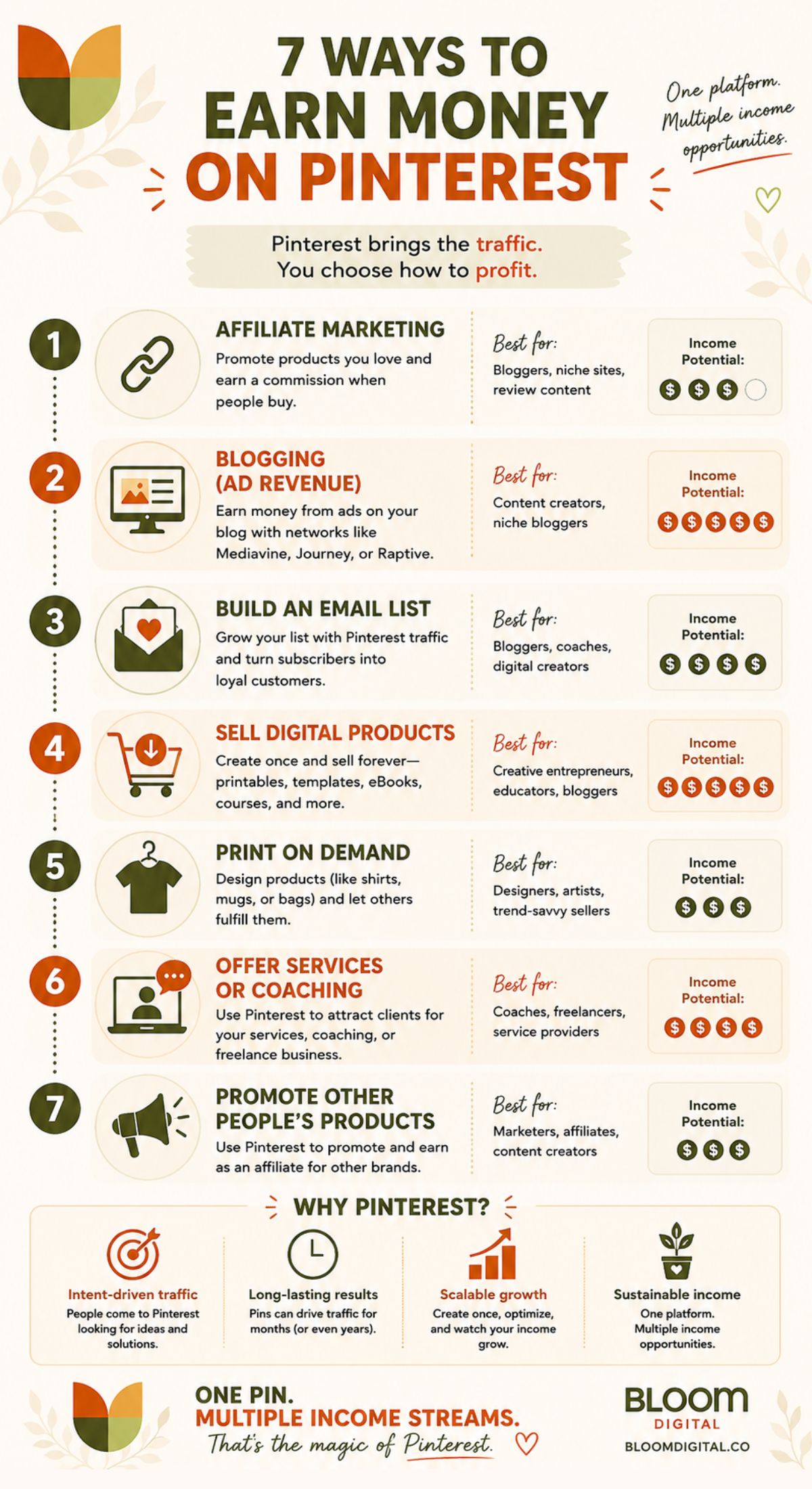
Method 2: Pinterest Affiliate Marketing
You don’t always need a blog between the pin and the commission. Pinterest allows you to link pins directly to affiliate products, which means someone can click your pin, buy the product, and you earn a commission — no website required (though having one definitely helps).
The easiest place to start is Amazon Associates. The approval bar is low, the product catalog covers almost any niche, and it’s the affiliate program most beginners can get into quickly. Commissions are modest (typically 3–5%) but the sheer range of products means almost any Pinterest content can be monetized.
Once you’ve got your footing with Amazon, you can level up to dedicated affiliate networks where commissions are significantly higher:
- FlexOffers — Strong for health, home decor, and e-commerce brands. Great if you’re in lifestyle niches.
- ShareASale — Wide variety of programs across almost every niche. Beginner-friendly approval process.
- PartnerStack — The go-to network for software and SaaS tools. If your content covers digital tools and online business, this is where the higher commissions live.
- Impact — Where you’ll find larger brand programs including Canva, and other well-known platforms.
⚠️ FTC Disclosure Reminder: Always disclose affiliate relationships on your pins and linked content. A simple “This post contains affiliate links” at the top of your article or in your pin description covers you legally and builds trust with your audience.
Method 3: Sell Your Own Digital Products
Digital products are one of the best ways to earn money online because you create them once and sell them indefinitely. Pinterest is an exceptional platform for driving traffic to digital product shops because the visual format is perfect for showing off planners, templates, printables, and design assets.
Etsy is the most natural home for digital products if you’re just starting out. You can pin directly to your Etsy listings, and the platform already has built-in buyer trust.
If you want to know which digital products are actually selling before you invest time creating them, Everbee is a research tool that shows you Etsy sales data, search volume, and competition — invaluable for making sure you’re not creating products nobody wants.
Method 4: Promote Print on Demand Products
Print on demand and Pinterest is an underrated combination that most beginners completely overlook. The idea: create designs for products like t-shirts, mugs, tote bags, or wall art using a platform like Printify or Printful, and it will feed your new product listing directly to your Etsy or Shopify shop. You can just link directly to specific items in your shop from Pinterest.
Pinterest’s visual format is perfect for product discovery — especially for the kinds of niche, design-forward products that POD sellers create. A well-designed mockup pin in a specific niche (think funny dog mom mugs or minimalist motivational wall art) can drive consistent shop traffic without any ad spend.
The products that tend to perform best on Pinterest: wall art, seasonal items, gifts with personality, customizable gifts, and anything with a strong visual aesthetic. Think about what would stop you from scrolling.
Method 5: Offer Services or Coaching
Don’t have a product yet? Lead with a skill. Pinterest can be a surprisingly effective platform for attracting service clients — especially in creative, business, and lifestyle niches.
Virtual assistants, social media managers, pin designers, copywriters, logo creators, and coaches have all used Pinterest to attract clients. Create pins that demonstrate your expertise or speak directly to the problem your ideal client is trying to solve. Link to a simple landing page or contact form.
If you want to offer services but aren’t sure where to start, Fiverr is a good low-barrier platform to list your offerings while you build your portfolio and reputation.
4. The Secret Weapon Most Pinterest Beginners Skip
Here’s the truth about why most Pinterest strategies fail: people guess at keywords (i.e. what people are searching for on Pinterest).
They pick words that sound right, write pin descriptions that feel relevant, and then wonder why their pins sit at zero impressions week after week. The problem isn’t the design or the posting schedule. The problem is that nobody is searching for the words they’re using.
Quick example:
Let’s say you are adding a Pin about a new healthy, high protein cookie recipe you created. You fondly refer to it as “Mama’s Big Cookie Recipe”, but no one is going to visiting Pinterest and actively searching for that phrase. If you had access to a tool like PinClicks, you could uncover other phrases (keywords) that people are searching for like “high protein cookies” (1,200 searches per month) or better yet, “high protein snacks” (435,000 searches per month).
So instead of a Pinterest title called “Mama’s Big Cookie Recipe” you could do something like “Best High Protein Cookies – Made by Mama”. And in the pin description, you can add in a few other relevant keywords like “high protein snacks” or “healthy cookie recipes”.
This is exactly why PinClicks has been, genuinely, one of the most valuable tools in our entire toolkit. It’s a Pinterest-specific keyword research tool that shows you what people are actually searching for on the platform — with real search volume data.
On a personal note, I use PinClicks almost every single day – usually several times daily – and it is has completely changed how my team creates content and pinterest pins. Before, we were creating articles and pins based on browsing Pinterest (for hours!) and on intuition . Now, every pin title, every description, every board name is built around search terms we know people are actually looking for.
Here’s another simple example of how it works:
Say you want to write a pin about making money from home. You might naturally use the phrase “work from home ideas” — which sounds reasonable. But PinClicks might show you that “earn money from home” has 15,075 monthly searches on Pinterest while “ways to earn money online” only gets 828. Same general topic, dramatically different traffic potential. That’s the kind of data that changes everything.
If you’re serious about making Pinterest work as an income stream, this is the tool that bridges the gap between pinning and actually being found.
5. Tips to Actually Get Your Pins Seen
Once you know how to earn money on Pinterest, the next question is how to make sure anyone actually sees your pins. Here’s what actually moves the needle:
- Use keywords everywhere. Your pin title, pin description, board name, and board description should all include the keywords your ideal reader is searching for. This is where PinClicks data pays off directly — use the actual search terms, not paraphrases of them.
- Use the right dimensions. Pinterest is built for vertical content. The ideal pin ratio is 2:3 (for example, 1000 x 1500 pixels) or 9:16 ratio also works well. If you are outside these ratios, there is a chance that your pin image can get cropped or deprioritized in feeds.
- Create fresh pins, not repins. Pinterest’s algorithm rewards new content. Create new pin designs for your content rather than just re-sharing existing pins. Even linking to the same article, a new pin image is considered fresh content.
- Consistency beats volume. Pinning 3 to 10 times per day consistently outperforms pinning 50 times one week and nothing the next. Set a sustainable schedule and stick to it.
- As of June 2026, I’m finding that it’s better to post 3 quality pins each day than just flooding Pinterest with 10 or 20 generic Canva-templated pins or pins that were 100% AI generated. Take a little extra time to make them look their best and it really pays off.
- Use niche-specific boards. A board called “Recipes” is fine. A board called “Quick & Healthy Dinner Recipes” is better. Specificity helps Pinterest understand who to show your content to.
- Design for the scroll. Use Kittl or Canva to create clean, readable designs with a clear focal point. The text on your pin should be readable as a thumbnail. If you have to zoom in to read it, it’s too small.
- Consider a scheduling tool. Tailwind is the most popular Pinterest scheduling tool and also shows analytics data that helps you understand your best-performing content. Scheduling in batches saves significant time.
6. How Long Does It Take to Make Money on Pinterest?
The honest answer: 4–6 months before you see meaningful, consistent traction. Possibly longer if you’re starting a new account from scratch.
That might feel discouraging, but here’s the flip side: a pin you create today can still be sending traffic to your site in 2027 or 2028. Pinterest has a compounding quality that no other platform matches. Your early pins don’t disappear — they accumulate, resurface, and keep working long after you’ve moved on to creating new content.
To put it in real terms: Bloom Digital went from a brand new Pinterest account to over 160,000 monthly impressions and 617% growth in outbound clicks in just 90 days — purely through consistent, keyword-driven pinning. That’s not overnight, but it’s also not years. The strategy works. The timeline just requires patience.
The people who quit at month two are the ones who miss the breakthrough at month four. If you’re building this as a genuine earn money online strategy — not a side hustle experiment — commit to six months of consistent effort before you evaluate whether it’s working.
7. Common Mistakes to Avoid
Save yourself months of frustration by avoiding these:
- Pinning without keyword research. This is the single biggest reason accounts stall. If you’re not using PinClicks or a similar tool to find real search data, you’re essentially guessing.
- Ignoring Pinterest Analytics. Your analytics tell you which pins are actually driving clicks — not just impressions. Double down on what works, not what you personally like best.
- Only pinning your own content. Pinterest rewards accounts that engage with the platform broadly. Pin a mix of your own content and relevant content from others in your niche.
- Giving up before the algorithm catches up. New accounts take time to build trust with Pinterest’s algorithm. Consistency in the early months is non-negotiable.
- Cluttered or unreadable pin designs. More text is not better. More visual elements are not better. Simple, clean, and clear wins every time.
- Forgetting affiliate disclosures. Not just an ethical requirement — it’s a legal one. A simple disclosure on every pin and linked post keeps you compliant and builds reader trust.
- Treating every pin the same. Different income methods need different pin strategies. An affiliate marketing pin and a blog traffic pin should look and read differently. Tailor each one to the action you want the reader to take.
My Favorite Pinterest Monetization Method
If I were starting over today and had to choose just one Pinterest monetization strategy, I would focus on driving Pinterest traffic to a blog. Not because it’s the fastest option. Not because it’s the easiest option. Because it’s the strategy that creates the biggest long-term asset.
Here’s why.
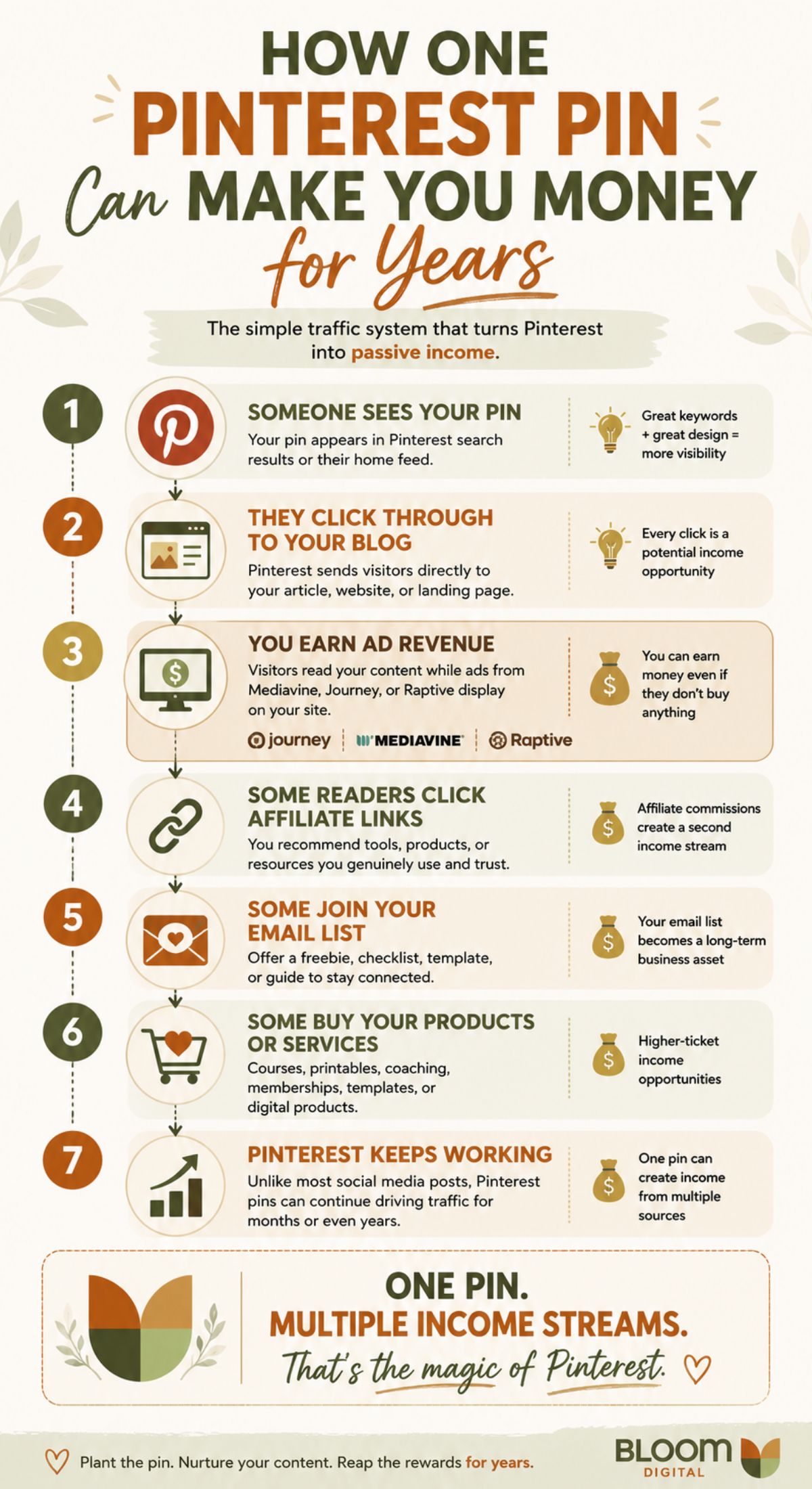
Let’s say you create a helpful article about meal planning, home decor, personal finance, or any topic people are actively searching for on Pinterest.
Someone discovers your pin. They click through to your blog.
Now several things can happen:
- You earn ad revenue while they’re reading your article.
- They may click an affiliate link and purchase a recommended product.
- They might join your email list.
- They could buy a digital product, template, printable, or course.
- They may return later and become a loyal reader.
That’s multiple potential income streams from a single piece of content.
This is one of the biggest reasons I love blogging. You’re not relying on just one way to make money.
A single Pinterest pin can send traffic to a blog post for months—or sometimes even years. And every visitor creates another opportunity for your content to earn. Compare that to many social media platforms where a post gets attention for a day or two before disappearing into the internet abyss forever.
Pinterest content tends to have a much longer shelf life.
Now, I want to be realistic. This isn’t a “make money by next Tuesday” strategy.
Blogging and Pinterest both reward consistency. It takes time to create content, build traffic, and gain momentum. But if your goal is building a real online business instead of chasing quick wins, I believe driving Pinterest traffic to a blog is one of the smartest and most scalable approaches available today.
If I were building from scratch right now, that’s exactly where I’d start.
Ready to Start Earning From Pinterest?
Learning how to make money on Pinterest isn’t about finding some secret trick — it’s about understanding that Pinterest is a search engine, treating it like one, and showing up consistently enough to let the platform work in your favor.
Whether you’re here to drive traffic to a blog, earn commissions through affiliate marketing, sell digital products, launch a print on demand shop, or attract clients for a service — the foundation is the same: great keywords, great design, and a willingness to be consistent when the results aren’t immediate.
Start with one method. Pick the tools that fit where you are right now. Do the keyword research before you pin a single thing. And don’t underestimate what’s possible with a platform that keeps sending traffic long after you’ve moved on to creating something new.
Tools we use and recommend:
- PinClicks — Pinterest keyword research that shows you what people are actually searching for
- Ideogram — Pin design tool built specifically for Pinterest
- Amazon Associates — The easiest affiliate program to start with
- Printify — Print on Demand supplier with hundreds (if not thousands) of products you can customize and connect directly to your Etsy shop
- Everbee — Find winning Etsy products before you create them
- Tailwind — Schedule your pins and analyze what works
Please note: This website contains affiliate links. As an Amazon Associate, we earn from qualifying purchases at no additional cost to you.